
Hey there, fellow Mac enthusiasts and crypto curious! If you’re rocking an iMac with Apple’s shiny M2 chip (or eyeing an upgrade), you might be wondering: Can I mine cryptocurrency without turning my desk into a furnace? The answer is a resounding yes—especially for Monero (XMR), the privacy-focused coin that’s all about fair, accessible mining. In this post, I’ll walk you through why solo mining is a pipe dream, share real-world hash rates for Apple’s M-series chips, and give you a step-by-step tutorial to fire up XMRig on your iMac M2 using the reliable xmrpool.eu pool. We’ll even tweak threads (cores) and donation levels right from the Terminal. Let’s turn that idle horsepower into some privacy coins!
Quick Primer: Why Mine XMR on Apple Silicon?
Monero’s RandomX algorithm is CPU-friendly by design—it rewards smart, efficient processors over power-hungry GPUs or ASICs. Your M2’s unified memory and big caches make it a quiet contender, sipping just 15-20W while hashing away. It’s not going to make you rich (expect pennies per day after electricity), but it’s a fun way to support the network, learn blockchain basics, and maybe cover your coffee habit. Pro tip: Mine during off-hours to keep things cool.
Why Solo Mining Is Basically Impossible (And Why Pools Rule)
Picture this: Monero’s network hashrate hovers around 2.5-4 GH/s (gigahashes per second)—that’s billions of hashes cranked out every second by miners worldwide. Your iMac M2? It tops out at about 2,900 H/s (hashes per second). That’s like bringing a slingshot to a tank battle: Your share of the network is a measly 0.0001% or less.
- The Math of Misery: Blocks come every ~2 minutes, with ~0.6 XMR rewards each. Solo mining means you solve the puzzle alone. Statistically, you’d wait years (or decades) for a block—think lottery odds, but with worse prizes. Current network difficulty? Over 500 billion. One M2 block? Equivalent to solving 1.4 million lotteries in a row.
- Pool Power: Pools like xmrpool.eu combine everyone’s hash power for frequent, proportional payouts (PPLNS system). You get steady micro-rewards based on your contribution—no solo dry spells. Fees are low (0.6-1%), and it’s way more reliable for hobbyists.
Bottom line: Solo = frustration. Pools = passive income vibes.
Apple M-Series Hash Rates: How Your Chip Stacks Up
Based on community benchmarks from XMRig (as of late 2025), here’s a snapshot of base-model performance on RandomX. These are averages under optimal conditions (macOS, XMRig v6.22+). Higher-end Pro/Max variants scale up 1.5-2x with more cores.
| Chip Model | Cores (Perf + Eff) | Avg. Hash Rate (H/s) | Efficiency (H/s per Watt) | Notes |
|---|---|---|---|---|
| Apple M1 | 4P + 4E (8 total) | 2,480 | ~150 | Solid starter; from 2020 MacBooks. |
| Apple M2 | 4P + 4E (8 total) | 2,890 | ~170 | ~17% faster than M1; great for iMacs. |
| Apple M3 | 4P + 4E (8 total) | 3,366 | ~180 | Base model uplift; Pro hits ~4,100. |
| Apple M4 | 3P + 6E (9 total) | 3,986 | ~200 | Architectural tweaks shine here. |
| Apple M5 | 4P + 6E (10 total) | ~4,584 (est.) | ~220 | Latest beast; pending more benchmarks. |
Sources: XMRig benchmarks and Reddit/MoneroMining threads. Your M2 should net ~$0.10-0.20/day at current XMR prices (~$175) and power costs—tweak for your setup!
Step-by-Step: Mining XMR on iMac M2 with xmrpool.eu
Ready to roll? We’ll use XMRig, the gold-standard open-source miner. It’s lightweight, Mac-native (ARM64 builds), and dead simple via Terminal. Total setup: 10-15 minutes.
1. Prep Your Wallet
- Download the official Monero GUI wallet from getmonero.org (or use MyMonero for light mode).
- Create a new wallet and note your primary address (starts with 4 or 8). This is where rewards land. Example:
44AFFq5kSiGBoZ4NMD... - For testing, send a tiny XMR amount to verify.
2. Install XMRig
- Open Terminal (Spotlight search: Cmd + Space, type “Terminal”).
- Install Homebrew if you don’t have it:
/bin/bash -c "$(curl -fsSL https://raw.githubusercontent.com/Homebrew/install/HEAD/install.sh)" - Then:
brew install xmrig - Boom—XMRig is ready. (Alternative: Download pre-built ARM64 binary from xmrig.com/releases.)
3. Configure and Launch Mining
xmrpool.eu is stable, low-fee (0%), and PPLNS-payouts at 0.3 XMR min. Their stratum server: xmrpool.eu:9999.
Fire up mining with this base command (replace YOUR_WALLET and worker):
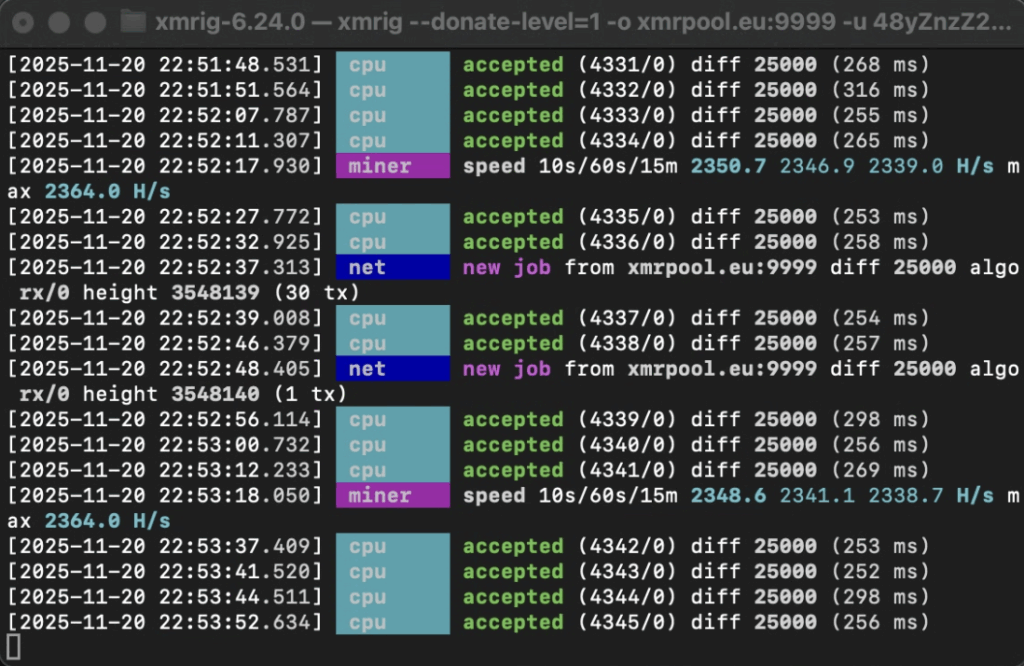
./xmrig --donate-level=1 -o xmrpool.eu:9999 -u yourwallet-public-address.2000+imac-m2 -k --tls -t 5-o: Pool URL/port.-u: Your wallet address.-p: Worker name (for tracking multiple rigs).
Customize Threads (Cores) for Your M2
M2 has 8 cores (4 performance + 4 efficiency), but full blast can throttle heat. Start with 6-7 threads for balance—aim for Perf cores first.
- 6 Threads (balanced, ~2,500-2,700 H/s):
./xmrig ... --threads=6 - 8 Threads (max, ~2,890 H/s, but monitor temps):
./xmrig ... --threads=8 - Pro command with affinity (Perf cores priority):
./xmrig ... --threads=4,4 --cpu-affinity=0xF0(tweaks core binding; test viasysctl hw.perflevel0.physicalcpucores).
Run it: Paste in Terminal, hit Enter. Green output = connected! Watch hash rate climb.
Set Donation Percentage
XMRig devs deserve love—default is 1% (1 minute/hour to their wallet). Pools like xmrpool.eu add ~0.6% fee. Customize:
- 1% (recommended): Default—no flag needed.
- 0% (selfish mode):
./xmrig ... --donate-level=0(but consider supporting open-source!). - 2% (generous):
./xmrig ... --donate-level=2
Full example command for M2 (6 threads, 1% donate):
./xmrig --donate-level=1 -o xmrpool.eu:9999 -u yourwallet-public-address.2000+imac-m2 -k --tls -t 5Hit Enter—mining starts! Ctrl+C to stop.
4. Monitor and Optimize
- Dashboard: Visit xmrpool.eu, enter your wallet to see stats (shares, payouts).
- Temps/Power: Use
htop(brew install htop) or Activity Monitor. Keep under 80°C. - Huge Pages: Boost ~20% hash: Edit
~/.xmrig.jsonor runsudo sysctl vm.max_map_count=262144. - Background It: Use
nohup xmrig ... &for headless running.
Trouble? Check XMRig logs for “accepted share” messages. If SSL needed (firewalls), swap to :9999.
Mine Smart, Stay Cool
Mining XMR on your iMac M2 is a low-stakes win: Eco-friendly, private, and a nod to decentralization. With pools handling the heavy lifting, you’re in for smooth sailing—and who knows, your rig might just secure the next private transaction on the Monero network. Got questions or your own benchmarks? Drop ’em in the comments!
Disclaimer: Mining uses power and may void warranties—mine responsibly. Not financial advice; XMR prices fluctuate. DYOR!